
The Quiet Revolution in Document Extraction: And Why It Matters More Than You Think
How AI agents are replacing decades-old technology, and a blueprint for what comes next.

Every organization runs on documents. Not the kind you casually scroll on your phone, but the dense, structured, often “complex” paperwork that moves money, validates identity, and binds agreements: insurance claims, medical records, loan applications, and legal contracts.
The irony is that in 2026, most of this information is still extracted the same way it was in 2006: by humans squinting at PDFs or by software that reads characters one pixel at a time without understanding a single word. That is changing fast.
The Key Point About Document Extraction: What We’re Really Trying to Solve
Let’s talk about the weight of documents in industries that touch almost everyone.
Healthcare processes over 30 billion clinical transactions annually in the US alone. Every claim, from a routine blood test to a complex surgery, generates a chain of forms: CMS-1500 physician claims, UB-04 hospital forms, Explanations of Benefits, prior authorization letters, and clinical notes. A mid-sized insurer processes 10,000 claims monthly. A large payer processes millions. Each claim can involve 3-8 pages of structured and unstructured content, and a single miskeyed digit, say, reading $38,000 as $88,000, can cascade into denials, resubmissions, and compliance risk.
Insurance lives and dies by its paperwork. Policy issuance, underwriting, claims adjudication, and regulatory filing are all document workflows. Peak seasons (hurricane season, enrollment periods) create surges that turn backlogs into bottlenecks. Insurance officials spend roughly 70% of their time on administrative document tasks rather than evaluating claims.
Legal and Financial Services rely on contracts, regulatory filings, KYC documents, tax forms, and audit trails, where precision isn’t a preference; it’s a legal obligation. A misinterpreted clause or an incorrect account number doesn’t just cause inconvenience; it creates liability.
Government and Compliance agencies process passport applications, tax returns, permits, and regulatory submissions, where national-scale volume meets zero tolerance for error.
The common thread: massive volume, varying document complexity, critical need for accuracy, and regulatory demand for traceability. The question isn’t whether to automate document extraction. It’s how and which generation of technology to use.
What Are We Actually Trying to Achieve?
Converting a scanned PDF into structured data requires four distinct levels of capability:
Level 1: Read the text. Convert pixels to characters (Basic OCR).
Level 2: Understand structure. Recognize that a grid is a table, the field name is a label followed by a value, and that columns should be read top-to-bottom, not left-to-right.
Level 3: Extract meaning. Understand that “$12,341.88” is a total, not just a string of numbers.
Level 4: Prove it. Provide “Visual Grounding” that points to the exact coordinates in the original document for auditability.
Each generation of document extraction technology reaches a different level. And the gap between technologies determines whether your organization is willing to adopt them to improve workflow efficiency, at the risk of higher design and implementation costs.
Generation 1: Traditional OCR (1990s–2020)
The Character Recognizers
Traditional OCR works by pattern matching at the character level. The extraction would work like this: scan the image pixel by pixel, identify character-shaped patterns, match them against known templates, and output plain text.
Architecture Diagram
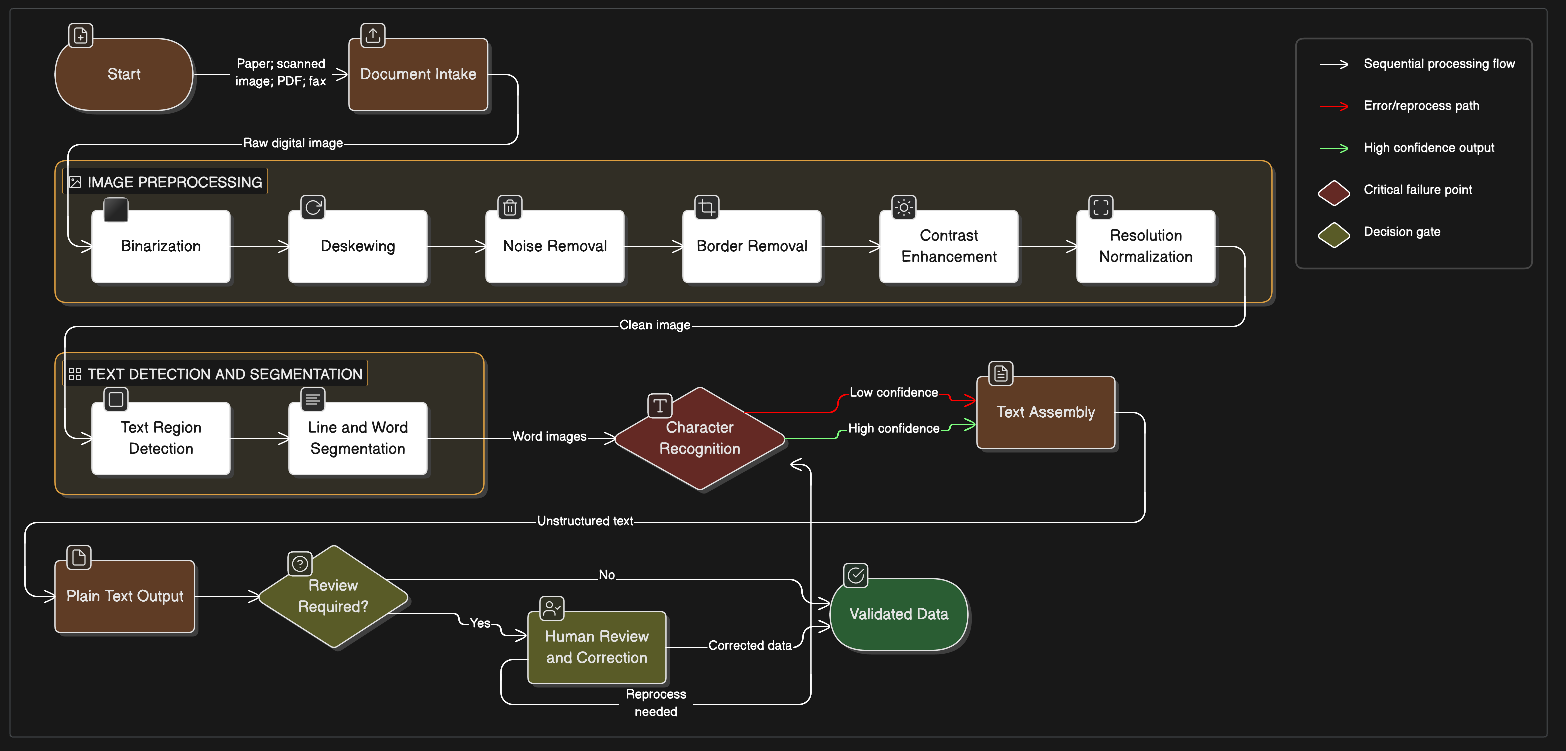
Key Systems that implement Traditional OCR technology:
Tesseract (HP → Google, open-source)
Version 3.x: classical computer vision + pattern matching
Version 4.x (2018): Added LSTM neural network layer
Still the most widely-deployed OCR engine in 2026
95%+ accuracy on clean printed text at 300+ DPI
Free and open source
ABBYY FineReader (commercial)
Industry standard for enterprise OCR since the 1990s
Better handling of complex fonts and layouts than Tesseract
$3,000–$15,000 per server license
Cloud OCR APIs
AWS Textract, Google Cloud Vision, Azure Document Intelligence
$0.001–$0.01 per page
Better than Tesseract on handwriting and complex layouts
GCP Vision achieves ~98% text accuracy on clean documents
Fundamental Limitations:
Zero Semantic Understanding: The Tesseract can’t distinguish a date from a phone number. For instance, “2024-0157” would be read as a string of characters.
Table Extraction is Broken: Tesseract cannot recognize text or data in tables without custom segmentation/layout analysis.
No Structure Preservation: Output is flat text.
Preprocessing burden: Every document must have certain regulations for the Tesseract to evaluate and fetch the values correctly
Handwritten is unsupported, and No Confidence signals for downstream use: There is no evaluation to point out uncertain data.
Cost at scale (30M pages/month):
Tesseract (self-hosted): ~$260K/month in infrastructure + labor
AWS Textract (text only): ~$103K/month (just $0.0006/page after 1M pages)
AWS Textract (with tables + forms): ~$862K/month (jumps 50-80x)
Hidden error cost at 15% error rate: ~$22.5M/month in rework
Generation 2: LLM-based OCR (2023–Present)
The Reasoning Readers
When GPT-4 gained vision capabilities in 2023, followed by Claude and Gemini, a radically simpler approach emerged. Instead of building a pipeline for preprocessing, character segmentation, and pattern matching, send the image to an AI model and ask it what it sees.
Architecture Diagram
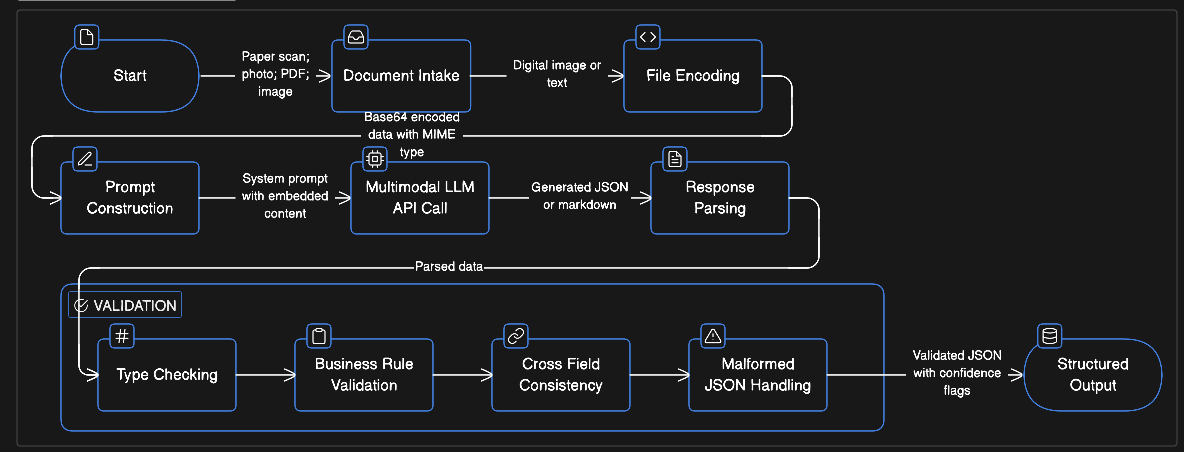
Strengths
Zero Preprocessing: Send Image; Provide prompt and let the LLM take care of the rest
Flexible Extraction: The output can be of any type; the requirement can be specified in a prompt
Semantic Understanding: An LLM understands the text it is given, whether it is a number or a person’s name.
OCR + Reasoning single API Call: LLM call can extract the value and provide necessary computations within a single call
MultiModal LLMs handle handwritten texts
Critical Weakness
Hallucination: They generate the text that seems plausible; they don’t read the text
There is a massive difference in the responses generated by API calls and UI-based extraction.
Cost Scales with Tokens, Not Pages
No Visual Grounding (Auditability Problem): There’s no way to verify the information once it’s extracted.
Content Policy Blocks: Certain LLMs do not process images of IDs and passports.
Cost at scale (30M pages/month):
Claude API: ~$1.77M/month
GPT-4o: ~$1.4M/month
Open-source models (self-hosted Qwen 2.5 VL): ~$504K/month (but only ~75% accuracy)
Error cost at ~2% hallucination rate: ~$3M/month
Generation 3: Agentic Document Extraction - ADE (2025–Present)
The Visual Analysts
In February 2025, Andrew Ng, co-founder of Coursera, founding lead of Google Brain, and founder of LandingAI, announced a new approach. His framing was direct: documents represent information visually, not just textually. Layout, charts, tables, and spatial relationships carry meaning. And unlike traditional OCR, which focuses on text, an agentic approach breaks a document into components and reasons about them.
By September 2025, LandingAI released DPT-2 (Document Pre-trained Transformer), and Ng emphasized a philosophy that applies beyond documents: “We’re past the era of one-size-fits-all models. Just as we use different processors for different workloads, your smartwatch has a less powerful processor than your laptop, and the datacenter for AI workloads too, we need different types and amounts of intelligence to do different things.”
Pioneered by LandingAI and Andrew Ng, ADE treats documents as visual systems. Humans don’t read an insurance claim in one glance; we scan headers, locate tables, and verify totals. ADE replicates this multi-step process.
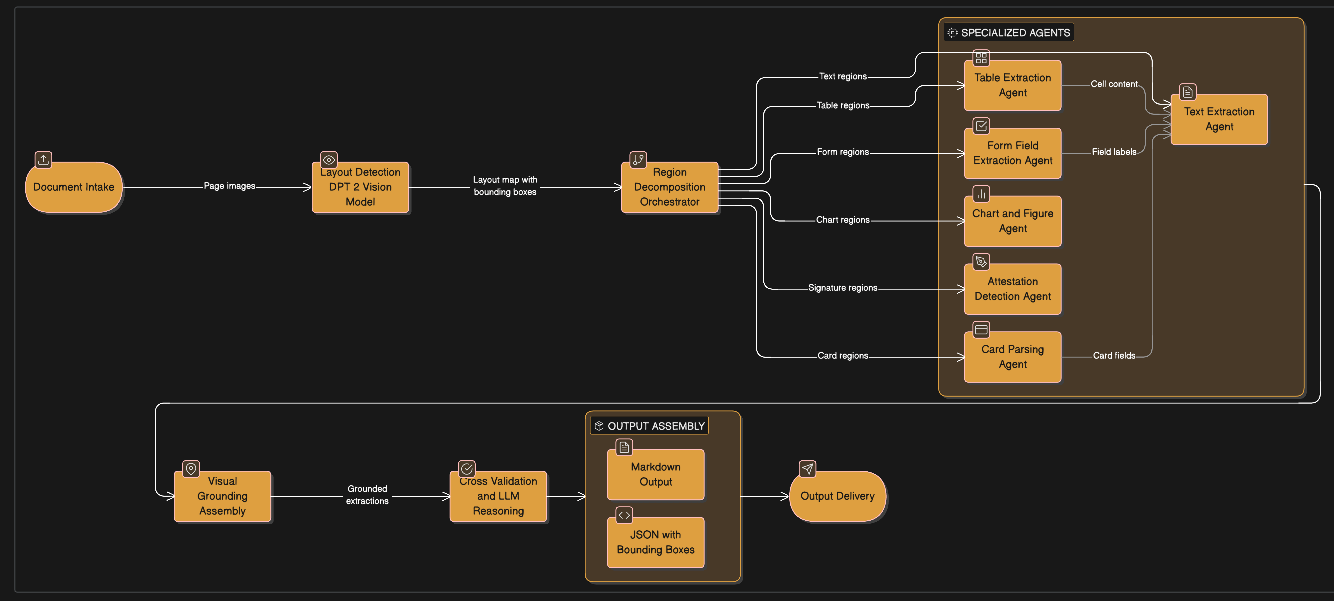
How ADE Operates:
ADE works the same way, in five stages:
Stage 1 — Layout Detection. A specialized vision model (DPT-2) scans the entire page and identifies the content: text blocks, tables, form fields, charts, images, signatures, and barcodes. It determines the reading order. Think of this as the “step back and survey the page” moment.
Stage 2 — Region Decomposition. The page is split into separate regions. Each table becomes its own task. Each text block becomes its own task; each chart, each form section, is separate.
Stage 3 — Specialized Extraction. Each region gets its own extraction agent. Each agent is optimized for its specific element type.
Stage 4 — Visual Grounding. Every single extracted element, every cell, every field value, every checkbox gets a bounding box: the exact pixel coordinates on the original page where it came from. This is the audit trail. You can point to any extracted value and say, “It came from here.”
Stage 5 — Cross-validation. Agents verify each other, and an LLM reasons over the combined outputs to ensure consistency. Conflicts get flagged. The final output is a hierarchical JSON document with structured markdown, ready for downstream systems.
The results back this up. On the DocVQA benchmark, ADE achieved 99.16% accuracy, meaning that from its parsed output alone, without ever showing the original image, an LLM could correctly answer 5,286 out of 5,331 questions about the documents. Only 18 failures were genuine parsing errors. That’s not raw OCR accuracy, it’s a measure of extraction completeness, and it’s remarkably high.
Let’s understand how the Model used in the landingAI differs from regular LLM models and what makes it special.
The DPT-2 Model (Document Pre-trained Transformer)
DPT-2 is LandingAI’s proprietary vision model, trained specifically on document understanding:
Not a general-purpose LLM. It’s a specialized vision model for layout detection and document structure.
Trained with data-centric AI methodology on high-quality, curated datasets with structured feedback loops.
Handles: Multi-level headers, nested tables, merged cells, multi-column layouts, checkboxes, signatures, barcodes, QR codes.
Predicts the table layout first, then extracts cells individually; this is why table accuracy is dramatically higher than LLM-based approaches.
Cell-level grounding reduces errors because each cell’s content is linked to its exact position.
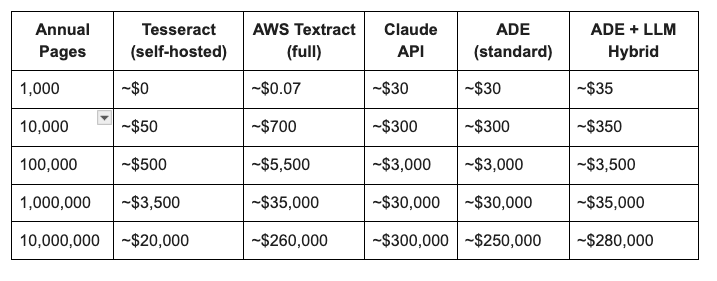
The Cost Picture: From 1,000 to 10 Million Pages Per Year
Here’s a simplified cost table. These are extraction costs only, not including human correction, which can be the single biggest hidden cost.
The cost estimate includes only setup and infrastructure costs from an enterprise perspective.
Can You Build This Yourself?
Every engineering team asks, “How can the organization tailor the construct to align with company standards?” The honest answer is nuanced.
The concept of agentic document extraction is absolutely not proprietary to LandingAI. The architectural pattern:
layout detection → region decomposition → specialized extraction → visual grounding → cross-validation
can be implemented independently. The building blocks exist:
Layout detection: Models such as YOLO, Detectron2, and LayoutLMv3 can detect tables, text, figures, and form elements.
Table extraction: Table Transformer, PaddleOCR’s PP-StructureV3, or custom table parsing.
OCR backbone: Tesseract, EasyOCR, PaddleOCR, or cloud APIs for text extraction per region.
LLM reasoning: Claude, GPT-4o, or open-source models for cross-validation and field extraction.
Grounding: Custom coordinate mapping from layout detection outputs.
What LandingAI provides is the orchestration of the “agentic” layer that sequences these steps, manages handoffs, handles edge cases, and has been refined on billions of pages. Their DPT-2 model is purpose-built for document layout understanding and is trained on curated, high-quality datasets with structured feedback loops. Replicating that level of refinement is a significant engineering undertaking.
The realistic assessment:
For a startup or small team (<100K pages/month): Use ADE’s API. The $0.03/page cost is trivial compared to the months of engineering required to build and maintain your own pipeline.
For a mid-size organization (100K–5M pages/month): ADE with enterprise pricing, potentially supplemented by cheaper approaches for simple document types.
For a large enterprise (>5M pages/month): Evaluate building a custom pipeline using open-source components for your specific document types, but use ADE or similar services as the benchmark your custom system must beat.
The Smart Architecture: Mix and Match
The most cost-effective approach isn’t to choose one generation and use it for everything. It’s matching the right tool to each document type.
Here’s how a sophisticated enterprise deployment might look:
Tier 1 — Simple, high-volume, low-stakes (correspondence, simple lookups, archival indexing) → AWS Textract text detection at $0.0006/page. Cheapest possible. Good enough.
Tier 2 — Structured forms with tables (claims forms, invoices, lab reports, financial statements) → ADE. This is where the agentic approach shines: cell-level table extraction, form field detection, and visual grounding for audit trails.
Tier 3 — Complex, ambiguous, or high-reasoning (medical records with clinical notes, multi-format submissions, documents requiring interpretation) → ADE for extraction + Claude/GPT-4o for reasoning. The LLM receives ADE’s clean, grounded output and adds interpretation, validation, or summarization.
Tier 4 — Special cases (ID cards, passports, checks) → Specialized APIs (ADE’s card chunk type, AWS Textract ID, or domain-specific providers like Veryfi for receipts).
A document classifier at the front of the pipeline routes incoming documents to the appropriate tier. This can be as simple as a rules-based router or as sophisticated as a lightweight ML classifier.
The result: your simple correspondence costs $0.0006/page. Your complex medical records cost $0.04–0.05/page (ADE + LLM). And you’re not overpaying for intelligence you don’t need on documents that don’t require it.
What the Industry Leaders Are Saying
The shift toward agentic document processing isn’t coming from just one company. It represents a convergence of thinking across the field.
Andrew Ng (LandingAI founder): An agentic approach lets us break a document into components and reason about them, moving beyond what traditional OCR and most PDF-to-text methods can achieve. He has consistently emphasized that document intelligence requires specialized models, not general-purpose LLMs repurposed for extraction.
Practitioners and researchers have increasingly reached consensus: use OCR (or specialized extraction) for faithful data capture and LLMs for reasoning transformation. One experienced engineer, after extensive testing with complex financial documents, put it bluntly: she stopped trying to force LLMs to do a job they were not designed for, and moved to a pipeline that separates extraction from interpretation.
Independent benchmark analysts have raised important cautions about vendor-published numbers. One analysis of competing benchmarks noted that results should always be paired with testing on your own data vendor benchmarks; by nature, they tend to highlight favorable conditions.
The market is responding. The global document management system market is projected to grow at a 12.7% CAGR, driven significantly by AI-powered extraction capabilities. And it’s not just LandingAI. Mistral has released a dedicated OCR model, Docsumo focuses on enterprise IDP, and open-source projects like Docling and Qwen 2.5 VL are pushing the boundaries of what’s possible without vendor lock-in.
The industry’s moving toward agentic, video-document’s intelligence. We are moving past the era of one-size-fits-all models. If you are building a document pipeline today, don’t just ask the Model to “read.” Ask your system to extract the data from the image.
The cost of being wrong is too high to settle for anything less than a grounded, multi-agent approach.
The cost estimates in this article are based on published pricing from AWS, Anthropic, OpenAI, LandingAI, and OCR.space as of early 2026, combined with industry data on error costs and processing volumes. All vendor benchmarks should be validated on your own documents. The author has no financial relationship with any of the companies mentioned.
Further Reading & Resources:
DeepLearning.AI: From OCR to Agentic Doc Extraction — Free course by Andrew Ng
LandingAI DocVQA Benchmark (99.16%) — Full methodology + all 45 errors published
CodeSOTA: Claude vs GPT-4o for OCR — Independent head-to-head comparison
“Don’t Use LLMs as OCR” — Marta F. García — Practitioner lessons
OmniAI OCR Benchmark — Structured extraction accuracy comparison
“Reality of Document AI Comparisons” — Critical analysis of vendor benchmarks
AIMultiple: ADE Tool Comparison — 5-tool benchmark on 60 images
AWS Textract Pricing — Official pricing tiers
LandingAI ADE Documentation — API reference (Parse, Split, Extract)
LandingAI ADE Helper Scripts — Production code examples
Cradl.ai: Using LLMs for Document OCR — Practical trade-off analysis
LLMs vs OCR: The Cost Trap — Mindee — Detailed cost comparison